I've worked with Rails for a long time, but I never
really understood the initialization process of a Rails application.
I knew that when I run bin/rails server, it starts the server,
but not how it transforms a directory of files into a running application.
This article is an attempt to understand that initialization process and to have a mental model of how Rails boots.
By booting a Rails application, I mean the sequence of steps that turns a Rails application from a pile of files and configurations into a fully initialized Ruby process that can accept HTTP requests, run console commands, execute background jobs, and perform other tasks.
We'll focus specifically on what happens when we run
bin/rails server.
Boot Process Overview
A Rails application is typically created using the rails new, which
generates a standard directory structure and a set of files that define
the application.
To understand how Rails initializes, we'll follow the execution flow through the following files:
- bin/rails
- config/boot.rb
- config/application.rb
- config/environment.rb
- config.ru
The config.ru file plays a crucial role in the boot process.
It's a Rack configuration file. It is the point where the
Rails application is handed over to the Rack-based web server(like Puma).
Rack is a Ruby interface for web servers and web applications. It creates a contract between web servers and web applications that how they should interact with each other.
The config.ru file is used to specify how the Rails application
should be run by the web server.
It contains the code to load the Rails application and start the server.
In this article, we will first trace how Rails reaches the config.ru
file, and then we will understand how it is used
to initialize the Rails application.
bin/rails server
When we run bin/rails server, execution starts in the bin/rails file.
This file is the entry point for all Rails commands,
including server, console, and others.
#!/usr/bin/env ruby
APP_PATH = File.expand_path("../config/application", __dir__)
require_relative "../config/boot"
require "rails/commands"
The key steps in this file are:
APP_PATHconstant is defined, which points to theconfig/application.rbfile.config/boot.rbfile is required to set up the environment.rails/commandsis loaded, which is responsible for handling the given command and executing it.
At this point, Rails has not yet initialized the application. It has just prepared the environment to run the command.
1. APP_PATH constant
The APP_PATH constant points to the config/application.rb file. Rails uses this later to locate and load the application class during initialization.
2. config/boot.rb file
ENV["BUNDLE_GEMFILE"] ||= File.expand_path("../Gemfile", __dir__)
require "bundler/setup" # Set up gems listed in the Gemfile.
require "bootsnap/setup" # Speed up boot time by caching expensive operations.
Let's see what's happening inside this file.
- It sets the
BUNDLE_GEMFILEenvironment variable to point to theGemfileif it's not already set. - It loads Bundler so the gems from the Gemfile are available.
- It requires Bootsnap to reduce boot time by caching expensive operations.
3. rails/commands file
After the environment is prepared, Rails loads rails/commands,
which is responsible for interpreting and executing the command
passed to bin/rails.
You can see this file in Rails source code.
It is located at railties/lib/rails/commands.rb.
# frozen_string_literal: true

require "rails/command"

aliases = {
  "g"  => "generate",
  "d"  => "destroy",
  "c"  => "console",
  "s"  => "server",
  "db" => "dbconsole",
  "r"  => "runner",
  "t"  => "test"
}

command = ARGV.shift
command = aliases[command] || command

Rails::Command.invoke command, ARGV
This file maps the common aliases to their full command names
and then invokes the command using Rails::Command.invoke method.
The invoke method resolves the command name, locates the
corresponding command class, and executes it. For example, when
we run bin/rails server, Rails invokes the Rails::Command::ServerCommand class.
In the Rails source code, this class is defined in
railties/lib/rails/commands/server/server_command.rb file.
module Rails
  module Command
    class ServerCommand < Base # :nodoc:
      def perform
        set_application_directory!
        prepare_restart

        Rails::Server.new(server_options).tap do |server|
          # Require application after server sets environment to propagate
          # the --environment option.
          require APP_PATH
          Dir.chdir(Rails.application.root)

          if server.serveable?
            print_boot_information(server.server, server.served_url)
            after_stop_callback = -> { say "Exiting" unless options[:daemon] }
            server.start(after_stop_callback)
          else
            say rack_server_suggestion(options[:using])
          end
        end
      end
    end
  end
end
I want to draw your attention to the three key steps in the
perform method of the ServerCommand class.
- First, it creates an instance of the
Rails::Serverclass with the server options. It is a subclass of theRack::Serverclass. Theserver_optionsmethod in Rails::Command::ServerCommand is defined as follows:
module Rails
  module Command
    class ServerCommand < Base # :nodoc:
      no_commands do
        def server_options
          {
            user_supplied_options: user_supplied_options,
            server:                options[:using],
            log_stdout:            log_to_stdout?,
            Port:                  port,
            Host:                  host,
            DoNotReverseLookup:    true,
            config:                options[:config],
            environment:           environment,
            daemonize:             options[:daemon],
            pid:                   pid,
            caching:               options[:dev_caching],
            restart_cmd:           restart_command,
            early_hints:           early_hints
          }
        end
      end
    end
  end
end
For example, the default server is set to puma and the
default port is set to 3000. Also, if no environment is specified,
it defaults to development
-
Next, It call to
require APP_PATH, which we defined earlier inbin/railsfile. This is where Rails loads config/application.rb and begins initializing the application itself. -
And finally
server.startmethod is called to start the web server via Rack. This is where Rack takes over and starts the web server.
By default, Rack looks for a config.ru file in the application root,
which is where control is handed off to the Rack interface.
The role of config.ru in Rails Initialization
The config.ru file is a Rack configuration file that tells the Rack-based
web server how to start the Rails application. It is located in the root
directory of the Rails application.
# This file is used by Rack-based servers to start the application.

require_relative "config/environment"
run Rails.application
Rails.application.load_server
Let's walk through this file line by line.
config/environment.rb
The first line requires the config/environment.rb file.
This file is responsible for loading the Rails application
and initializing it.
# Load the Rails application.
require_relative "application"

# Initialize the Rails application.
Rails.application.initialize!
Requiring config/application.rb defines the application class, while
Rails.application.initialize! performs the full initialization process.
config/application.rb
The config/application.rb file defines the Rails application and declares which framework components should be loaded.
require_relative "boot"

require "rails"
# Pick the frameworks you want:
require "active_model/railtie"
require "active_job/railtie"
require "active_record/railtie"
require "active_storage/engine"
require "action_controller/railtie"
require "action_mailer/railtie"
require "action_mailbox/engine"
require "action_text/engine"
require "action_view/railtie"
require "action_cable/engine"
# require "rails/test_unit/railtie"

# Require the gems listed in Gemfile, including any gems
# you've limited to :test, :development, or :production.
Bundler.require(*Rails.groups)

module MyApp
  class Application < Rails::Application
    #...
  end
end
Let's break down the key steps in this file:
- It loads the config/boot file to ensure, Bundler and Bootsnap are set up, along with the Gemfile path.
- The core Rails framework is loaded.
- The specific Rails components (like Active Record, Action Controller, etc.) are loaded explicitly. This allows you to exclude components you don't need.
- Next, the gems specified in the Gemfile are loaded using Bundler.
- Finally, the application class is defined,
which inherits from
Rails::Application. This class is where you can configure application-wide settings.
Notice that we loaded multiple framework components in config/application.rb.
Active Record, Action Controller, Action Mailer, and others. But requiring
these files doesn't automatically initialize them. That happens during
Rails.application.initialize!, and that's where Railties, Engines,
and Initializers come in.
Railties, Engines, and Initializers
Each of the framework components (like Active Record, Action Controller, etc.) is implemented as a Railtie or an Engine.
Railtie
Think of a Railtie as a way for any library or gem to plug into Rails initialization process. A Railtie can define initializers, add configuration, hooks into Rails Initialization lifecycle and extend Rails classes.
Engine
An Engine is a specialized Railtie that behaves like a mini Rails application, with its own routes, models, controllers and initializers.
Initializers
Initializers are blocks of code that Rails runs during initialization.
They are the primary mechanism through which Railties and Engines
customize the application Rails.application.initialize!.
Not all initializers behave the same way:
- Some initializers run immediately during boot.
- Others register hooks using
ActiveSupport.on_load, which delays execution until a specific framework component is loaded. For example, Active Record registers an initializer that waits until ActiveRecord is loaded before establishing the database connection.
    initializer "active_record.initialize_database" do
      ActiveSupport.on_load(:active_record) do
        self.configurations = Rails.application.config.database_configuration

        establish_connection
      end
end- This delayed loading pattern improves boot performance. Instead of loading everything upfront, Rails waits until you actually use a component before fully initializing it.
- Rails also loads any custom initializers defined in the config/initializers directory and applies environment-specific configuration from config/environments/*.rb(development, production, or test).
When Rails.application.initialize! finishes, the Rails application is fully initialized.
Back to config.ru
Once initialization is complete, execution returns to config.ru
run Rails.applicationThis tells Rack which object should handle incoming HTTP requests. A Rails application implements the Rack interface, so Rack can route requests to it directly.
and the final line:
Rails.application.load_serverAt this point, the Rack-based web server (for example, Puma) starts, listens on a configured port(like 3000), and begins handling requests.
=> Booting Puma
=> Rails 8.0.0 application starting in development
=> Run `bin/rails server --help` for more startup options
Puma starting in single mode...
* Puma version: 6.5.2 (ruby 3.2.2-p0) ("Birdie's Version")
*  Min threads: 5
*  Max threads: 5
*  Environment: development
*          PID: 12345
* Listening on http://127.0.0.1:3000
* Listening on http://[::1]:3000
Use Ctrl-C to stop
Summary
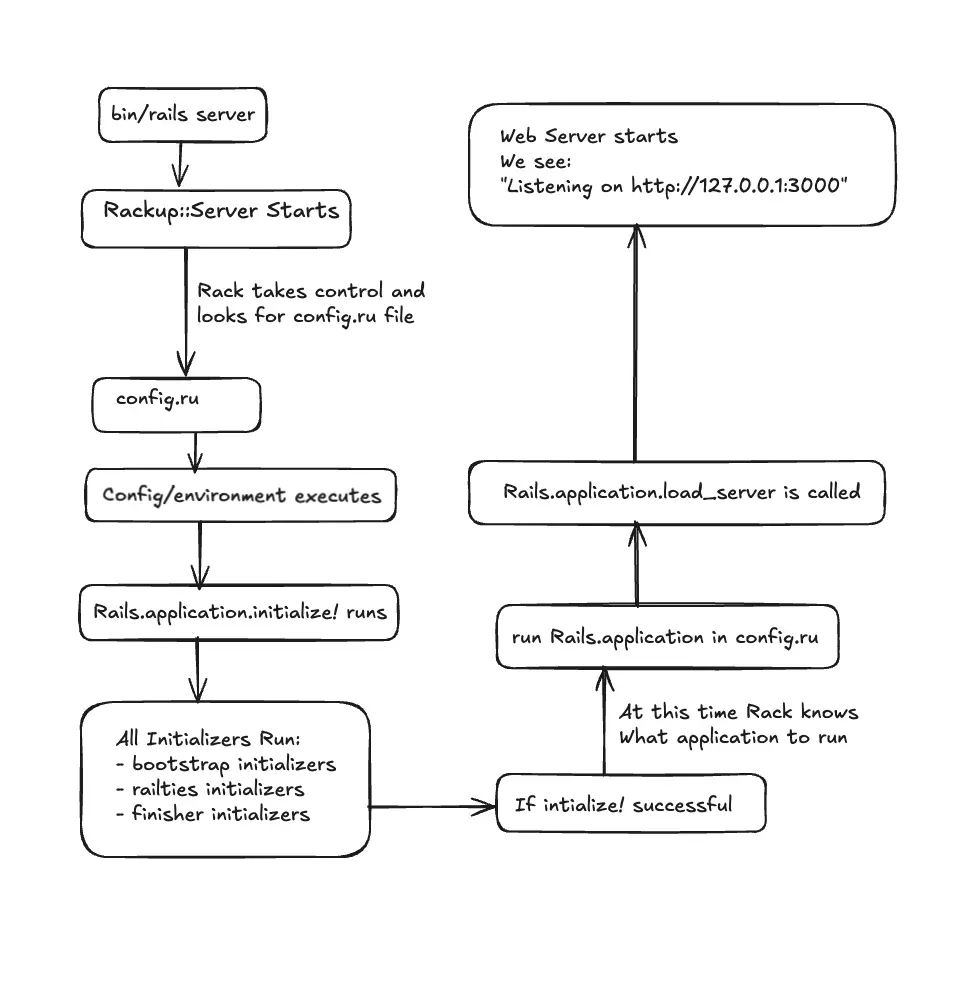
In this article, we traced how a Rails application boots and
initializes when we run bin/rails server.
We have seen the key steps in the initialization process and how
different components like Railties, Engines, and Initializers
are involved in this process. We also examined how
Rack-based servers use the config.ru file to start the application.
If you found this useful, feel free to share it with others exploring how Rails boots and initializes, also If you spot something inaccurate or incomplete, I'd be glad to hear from you.